What do I need to open a kiosk?
A Ghana mobile number, your own Ghana Card for a quick selfie check, and a store name. Then add a MoMo wallet in your name and your first product.
What you see
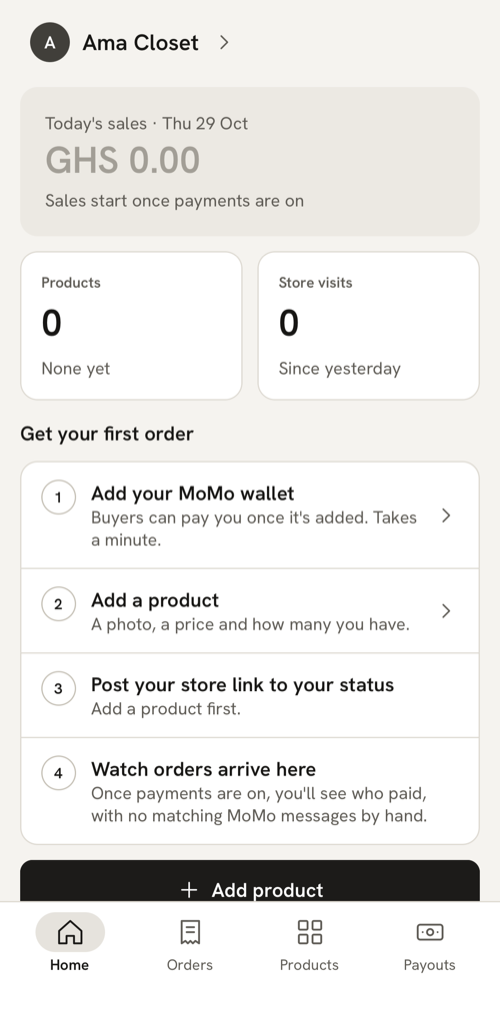
Opening a kiosk takes three steps in the app. Each screen shows where you are at the top: Verify phone, Ghana Card and Your store. When you finish, Home shows a short list called “Get your first order”.
What it means
You can sell on MeKiosk if you’re 18 or over. You don’t need a registered business. You need:
- A Ghana mobile number on the phone you sell with. We text a 6-digit code to it. Numbers starting 02 or 05 work. Landlines and foreign numbers don’t.
- Your own Ghana Card. The app photographs the front and back, or you upload saved photos of them, and then it takes a selfie. It also asks for your full name, as it’s written on the card. Each Ghana Card can open one store only, and buyers never see your card.
- A store name. It becomes your link, like ama-closet.mekiosk.shop.
- A MoMo wallet in your own name (MTN, Telecel or AirtelTigo), so buyers can pay you. You add it after your store is open.
What to do
- Open the MeKiosk app and tap Start.
- Type your phone number and tap Continue. Enter the code we text you and tap Verify.
- Choose a 4-digit PIN for your phone. From then on, your PIN, fingerprint or Face ID opens the app, so you don’t wait for a text each time.
- On “Verify with your Ghana Card”, type your full name (at least two names) and your card number, like GHA-123456789-0. Tap Continue.
- Photograph both sides of your card, or upload saved photos of them. Then take a selfie in good light, with no cap or sunglasses.
- Wait on “Checking your card”. It usually takes under a minute.
- On “Set up your store”, type your store name and wait for “Your link: …”. Add a logo, a tagline and a colour if you like, then tap Create store.
- On Home, work through “Get your first order”:
- Add your MoMo wallet. It must be in your own name. If the wallet’s name doesn’t match your Ghana Card, we check it by hand before payments switch on (more about wallet names).
- Add a product: a photo, a price and how many you have.
- Post your store link to your status. This opens once you have a product.
- Watch orders arrive here.
Payments switch on once your Ghana Card is verified and your wallet is approved. Until then, buyers can look around your kiosk but can’t pay, and the messages you share don’t mention MoMo. See When do payments turn on for my store?
If your link is taken or refused
Your link is made from your store name. Under the name you may see:
- “{link} is taken.” Another store has it. Tap one of the links under “Try one of these”, or change the name.
- “{link} is reserved.” Words like shop, store, pay and checkout are kept for MeKiosk.
- “Store links can’t include “{word}”.” Links can’t use words that could pass for MeKiosk, Paystack, a mobile network, or words like support and verified. This stops anyone pretending to be them.
- “Store links need at least 3 letters or numbers.”
- “Use letters or numbers in your store name.”
Choose with care: your link never changes. You can rename your store later in Account → Store settings, and the link stays the same, so links you’ve already posted keep working. Store names can’t include MeKiosk or Paystack either.
If your Ghana Card is already linked
“This Ghana Card is already linked to another MeKiosk account.” means your card already opened a store. Each card can open one store.
If that store is yours and you’ve changed your number, don’t start a new one. Tap Sign out, then Sign in with your new number and choose Recover my store. How to move your store to a new number.
If the store isn’t yours, message us.
If your card check is in review
Sometimes a person needs to look at your check. You can still create your store, add products and share your link. Home shows “Payments not on yet — verification in review” until we’re done, and the app tells you the result.
If the check doesn’t pass, the app says why, for example “Your selfie didn’t match the card”, and lets you try again. See Why did my Ghana Card check fail or go to review?
If you already have a store
If you tap Start with a number that already has a store, the code takes you straight to it. You won’t get a second store: each seller has one.
Last updated .