When do payments turn on for my store?
Buyers can pay you once your Ghana Card is verified and your MoMo wallet is matched or approved. What works before then, and what buyers see.
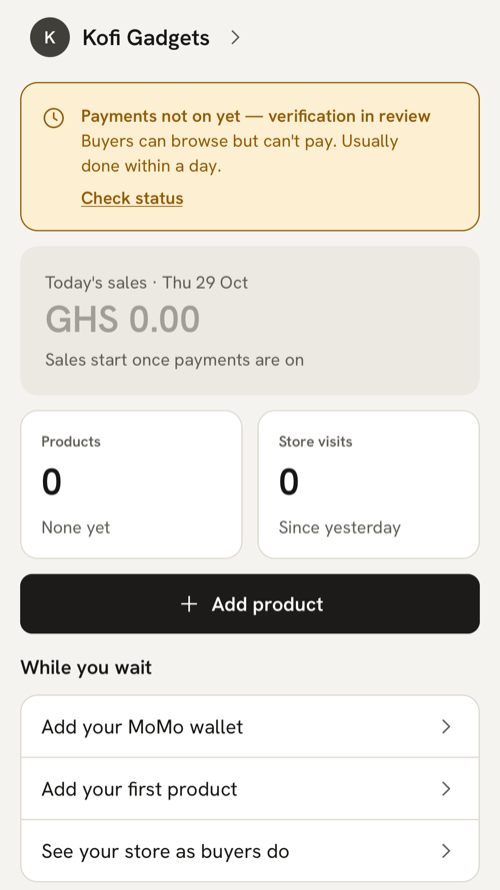
What you see
Until buyers can pay you, Home’s sales card reads “Sales start once payments are on”. You may also see:
- “Payments not on yet — verification in review” with “Buyers can browse but can’t pay. Usually done within a day.” and Check status, while your Ghana Card or MoMo wallet is being checked.
- “Add your MoMo wallet” in your checklist, with “Buyers can pay you once it’s added. Takes a minute.”, if you haven’t added one.
- “Switching on payments” with “Setting up payouts to your MoMo wallet. This usually takes a few minutes.”
What it means
Payments turn on when both of these are done:
- Your Ghana Card is verified. See Why did my Ghana Card check fail or go to review?
- Your MoMo wallet is in your Ghana Card name, or a person at MeKiosk approved it after review. See My MoMo wallet name doesn’t match my Ghana Card
Then Paystack, our payment provider, sets up payouts to your wallet, which usually takes a few minutes. When it’s done you get the notification “Payments are on” with “Buyers can pay you by MoMo now. Share your store link.” With Text messages (SMS) switched on in Account → Notifications, you also get the text “Payments are on. Buyers can now pay you by MoMo from your store link.” This message comes once, the first time payments turn on.
Payments are also off while your store is locked, and while MeKiosk has paused it.
What to do
- Finish whatever is still open: your Ghana Card check and your MoMo wallet.
- Use the wait. Add products, make status images and share your store link. Before payments are on, Share store sends “Take a look at {store}: {link}” and never mentions MoMo. Once they’re on, it sends “Shop {store} and pay by MoMo: {link}”.
- On Home, tap Check status to look again. “Still in review” means nobody has decided yet. You can also pull Home down to refresh it.
What buyers see meanwhile
Your kiosk opens and buyers can look around. The front page and product pages say “{store} isn’t taking payments yet” with “You can look around. Ordering opens once the seller’s payments are switched on.” There’s no Add to cart or Buy now, and the cart shows “Checkout isn’t open yet”. If you share your WhatsApp, buyers can still chat with you.
The “Verified seller” tick appears next to your store’s name once payments are on.
Order links wait too. The New order link screen says “Payments aren’t on yet” and “Buyers can pay order links once your payments are switched on.” An order link you sent earlier shows “Payments aren’t switched on yet” instead of the pay button.
When payments turn on, your kiosk shows Add to cart and Buy now within about a minute. If a buyer still sees the old page, ask them to reload it.
If payments were on and now they’re off
- You changed your MoMo wallet. A new wallet that needs review turns payments off until it’s approved. Home shows “MoMo wallet in review” with “Payments switch on once we’ve checked it — usually within a day.” You won’t get “Payments are on” again when they come back.
- You locked your store. Unlock it with your Ghana Card selfie to take payments again.
- Your store is paused. Home says “Your store is paused”. Message us from Account → Help on WhatsApp.
If everything is approved but payments are still off
Give it a few minutes, then pull Home down to refresh. If Home says “Payouts couldn’t be set up”, the MoMo network turned down your wallet: tap Change MoMo wallet and add another one in your name. If nothing changes after an hour, message us from Account → Help on WhatsApp.
Last updated .