I was signed out, lost my phone or my store is locked
Why the app signs you out, what your PIN does, how to lock or unlock your store with your Ghana Card, and how to move your store to a new number.
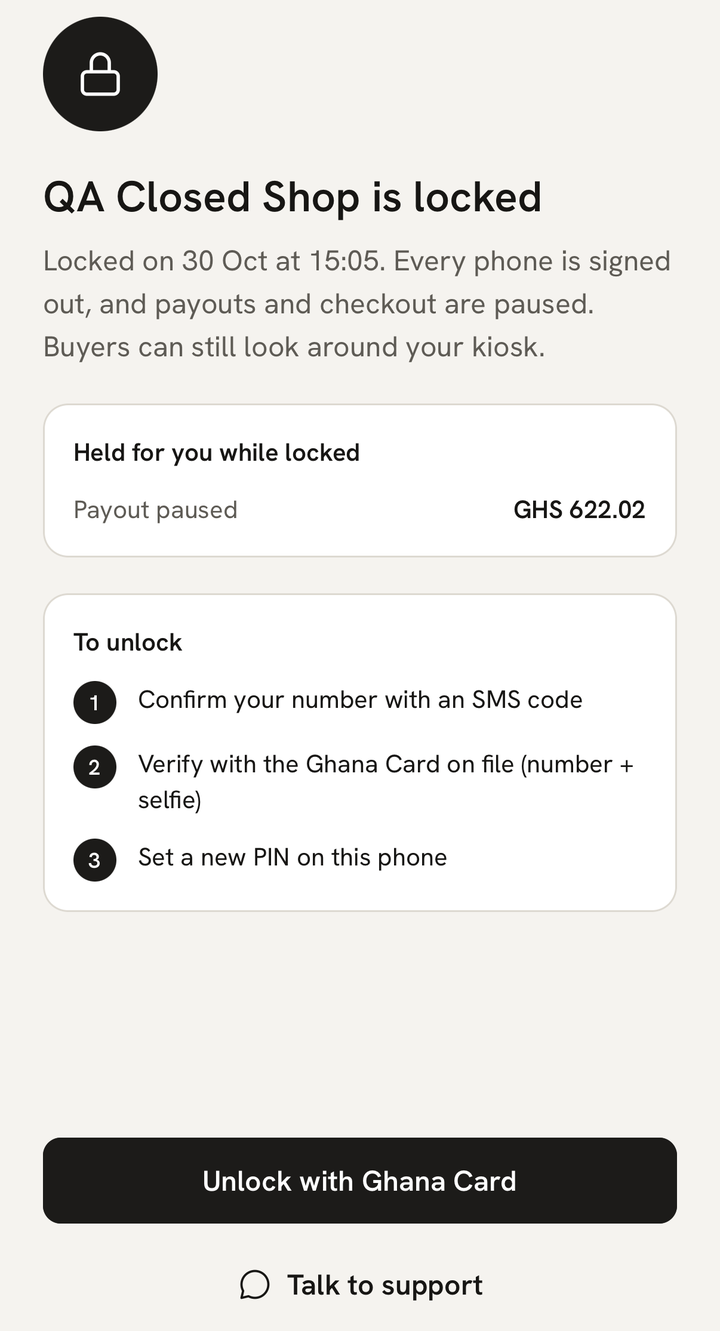
What you see
One of these:
- “You’ve been signed out”, because you haven’t opened the app on this phone for 30 days.
- “Your store was opened on another phone”.
- “Too many wrong PINs” on the screen that opens the app.
- “{store} is locked”.
- A text saying support locked your store or signed you out.
What it means
Three things keep your store safe:
- Your phone number. Signing in needs a code texted to it. Only one phone can be signed in to your store at a time, so signing in on a new phone signs the old one out.
- Your PIN. It opens the app, or your fingerprint or Face ID does. The app asks every time it starts and after 5 minutes away. Your PIN stays on your phone: MeKiosk can’t see it.
- Your Ghana Card. Unlocking your store and moving it to a new number need your Ghana Card and a selfie.
Being signed out loses nothing, and your kiosk keeps working for buyers. A locked store is different: every phone is signed out, buyers can look around but can’t pay, and your payouts are held until you unlock it.
What to do
If you see “You’ve been signed out”:
- Tap Send code to +233 ….
- Enter the code. Your PIN still works on this phone, so you go straight to Home.
If your store was opened on another phone
The screen says which phone and when.
- It was you, on a new phone: tap “Yes, that was me — sign in here” and enter the code. This phone works again, and the other one is signed out.
- It wasn’t you: tap “That wasn’t me — lock my store”, then Lock my store. Every phone is signed out at once and nobody can pay you until you unlock. Then message us, and ask your network if someone has your SIM.
You can lock your store only once your Ghana Card is verified. Before that, you’ll see “Your store can be locked once your Ghana Card is verified. Message MeKiosk support for help.”
If you forgot your PIN
Tap Forgot PIN? Sign in with SMS code, enter the code and choose a new PIN. After 3 wrong PINs the app shows “Too many wrong PINs” and asks for a code anyway. Tap Send code.
Giving your phone to someone else? In Account, tap Sign out of this phone and switch on Also forget PIN on this phone.
If you lost your phone
- Tell us straight away by email at support@mekiosk.store. If your Ghana Card is verified, we can lock your store for you, and you’ll get a text saying so.
- Ask your network for a new SIM with the same number.
- Sign in on your new phone. This signs the lost phone out.
- If your store was locked, unlock it as below.
Until then, the app on the lost phone asks for your PIN whenever it restarts or has been in the background for 5 minutes.
If your store is locked
- Tap Unlock with Ghana Card and enter the code we text you.
- Type the number of the Ghana Card your store was verified with and tap Continue. Any other card gets “That isn’t the Ghana Card this store was verified with.”
- Take a selfie in good light, with no cap or sunglasses.
- When the check passes, choose a new PIN. Buyers can pay you again.
Money held while your store was locked isn’t lost. It’s paid out to your MoMo wallet after you unlock, and the app tells you when it’s on its way.
If the check doesn’t pass, the app says why and “Your store stays locked until the check goes through.” Tap Try again. You get 5 checks in 24 hours. After that you’ll see “You’ve used today’s 5 Ghana Card checks. Try again tomorrow, or message MeKiosk support.”
“We need to check this by hand” means a person must look at your check. Tap Help on WhatsApp and we’ll help you unlock.
If you changed your number or lost your SIM
You can move your store to a new number with your Ghana Card:
- On a phone with the new number, tap Sign in and enter the code.
- On “No store uses this number”, tap Recover my store.
- Type your full name as it’s written on your card, and the number of the Ghana Card your store was verified with. Tap Continue.
- Photograph both sides of the card, or upload saved photos of them, and take a selfie.
- Wait on “Matching your card to your store”, then choose a PIN.
Your products, orders and payouts move with the store, and payouts keep going to the same MoMo wallet. The old number is signed out everywhere and gets a text saying the store moved.
You get 2 tries in 24 hours, for each number and for each card. After a failed try you’ll see “We couldn’t match that card”, and once both are used, “Recovery is paused for 24 hours to protect sellers from account takeover.”
The new number must never have set up a store of its own. If it has, you’ll see “A store can only be moved to a number that has never set one up.” Use another number, or message us. If you tapped Start on the new number and your card got “This Ghana Card is already linked to another MeKiosk account.”, you can still recover: tap Sign out, then Sign in with the new number.
If you got a text you didn’t expect
These texts tell you about changes to your account:
- “Support locked your store. Payments and payouts are paused until you unlock it in the app with your Ghana Card. Didn’t ask for this? Message support.”
- “Support signed you out of the app on every phone. Sign in again with a code sent to this number. Didn’t ask for this? Message support.”
- “Your store was moved to a new phone number ending {digits}. If you didn’t do this, message support now.”
If you didn’t ask for it, tell us at once by email at support@mekiosk.store, or with any support button in the app.
Last updated .