My MoMo wallet name doesn't match my Ghana Card
Why the app shows your MoMo wallet's registered name, what happens when it doesn't match your Ghana Card, and what to do if it isn't approved.
What you see
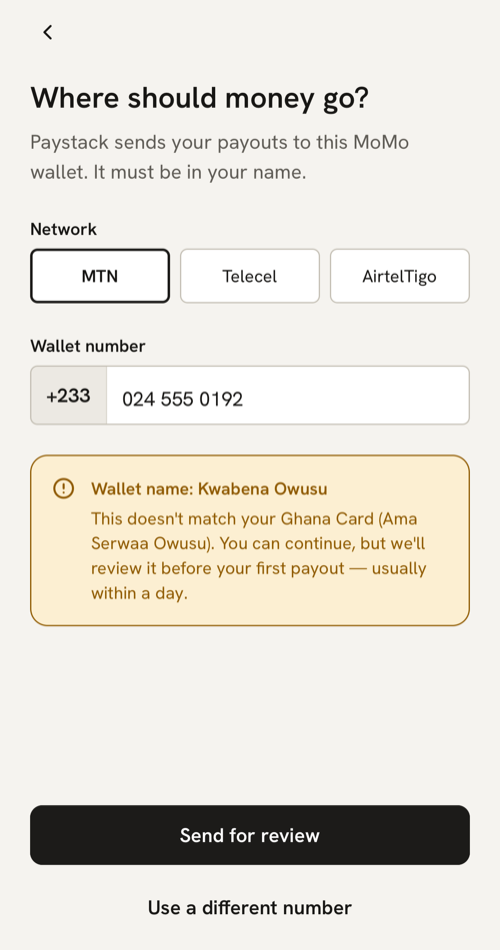
On Home, tap Add your MoMo wallet, or go to Account → MoMo wallet. The screen asks “Where should money go?” and says “Paystack sends your payouts to this MoMo wallet. It must be in your name.”
Choose your network (MTN, Telecel or AirtelTigo) and type the wallet number. As soon as both are filled in, the app shows the name the network has registered for that wallet:
- Green: your name, with “Name on wallet matches your Ghana Card.” Tap Confirm wallet.
- Amber: “Wallet name: {name}”, with “This doesn’t match your Ghana Card ({your name}). You can continue, but we’ll review it before your first payout — usually within a day.” You can tap Send for review or Use a different number.
- Plain: “Wallet name: {name}”, with “We’ll compare it with your Ghana Card once your card check is done.” This shows until your card check gives us your name.
What it means
Payouts only go to a MoMo wallet registered in your own name, so we compare its name with your Ghana Card. Capital letters and the order of your names don’t matter, and a wallet that leaves out a middle name usually still matches. A different spelling, a nickname or someone else’s name doesn’t match, so a person at MeKiosk checks it first, and payments stay off until then.
What to do
- If the wallet is yours but the name is spelt or shortened differently, tap Send for review. It’s usually checked within a day, and we may call you first.
- If the wallet belongs to someone else, even a husband, wife or parent, tap Use a different number. We can’t approve a wallet in another person’s name.
- If you don’t have a wallet in your own name, register one with your network using your Ghana Card, then add it here.
While your wallet is in review, Home says so and Account shows “We’re checking your wallet name”. When it’s approved, payments turn on within a few minutes. See When do payments turn on for my store?
If your wallet isn’t approved
You get the notification “MoMo wallet not approved” with the reason, and a text too if you’ve switched on Text messages (SMS) in Account → Notifications. The wallet screen shows “Your last wallet wasn’t approved” with one of these:
- “Your last MoMo wallet isn’t in your Ghana Card name. Add a wallet in your own name.”
- “We couldn’t confirm your last MoMo wallet is yours. Add a wallet in your own name.”
On Home, tap Change MoMo wallet or the Add your MoMo wallet step, or go to Account → MoMo wallet, and add a wallet in your own name. Saving it clears the old reason and checks the new name.
If the app says no wallet is registered
“No MTN MoMo wallet is registered to this number.” (or Telecel, or AirtelTigo) means that network has no wallet on that number. Check the digits and the network. Telecel used to be Vodafone.
If the app couldn’t check the name
“Couldn’t check the wallet name” means the MoMo network didn’t answer. Wait a minute and type the number again, or tap Save for review and we’ll check the name before your first payout.
If the app says “Too many wallet checks”
Every name lookup counts, and so does saving: 10 a minute and 20 an hour. The message says how long to wait, such as “Too many wallet checks. Try again in a minute.”
If Home says “Payouts couldn’t be set up”
With “The MoMo network turned down this wallet. Try a different MoMo wallet.”, or “…Try a different one.” in your checklist, Paystack couldn’t set up payouts to that wallet. Add another wallet in your own name.
If you change your wallet later
Account → MoMo wallet opens an empty form, so choose the network and type the number again. A new wallet that matches keeps payments on. One that needs review turns payments off until it’s approved, and Home shows “MoMo wallet in review”. The first payout to a new wallet can take longer while it’s verified.
Last updated .