A buyer says they've paid, but the order isn't Paid
An order turns Paid only when Paystack confirms the money, never from a screenshot. Here's how to check the order and what to tell the buyer.
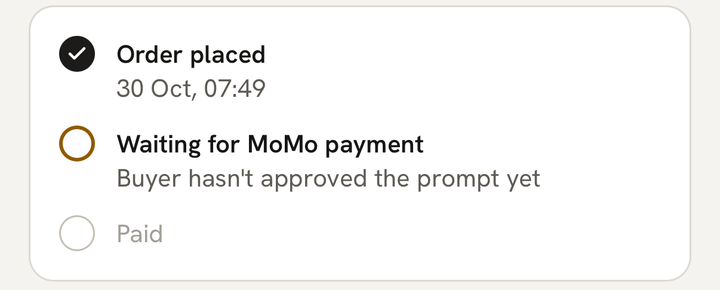
What you see
A buyer tells you they’ve paid, sometimes with a screenshot, but in the app the order still says Waiting for payment, or it isn’t under Paid.
What it means
An order turns Paid only when Paystack confirms the money came through. A screenshot, a forwarded MoMo message or a buyer’s word can’t make an order Paid, because any of them can be wrong or faked. When Paystack confirms, the order changes by itself and you get “You’ve been paid {amount}”.
So if the app doesn’t say Paid, the payment hasn’t reached MeKiosk yet. Don’t deliver until it does.
What to do
- Ask the buyer for their order code, like AC-7K3P. It’s on their order page.
- Open Orders, tap the search icon and type the code. You can also search by the buyer’s name, or 4 or more digits of their number. Search looks through every tab, whatever the order’s status.
- Open the order. Under Waiting for MoMo payment, a line tells you how far the buyer got:
- Buyer hasn’t started paying yet: they haven’t tapped Pay. Tap Send payment link to send them the link again.
- Buyer hasn’t approved the prompt yet: a MoMo prompt went to their phone and needs their PIN. On MTN they can dial *170#, then My Wallet and My Approvals.
- Buyer is entering the MoMo code: their wallet asked for a code first. The prompt comes after it.
- Buyer is paying on Paystack’s page: they chose to pay on Paystack’s own page.
- The last try didn’t go through: the prompt was declined, expired or failed, and no money was taken. They can try again from the same link while the items are still held.
- Keep the order open. It updates by itself, and you’ll be told the moment it’s paid.
- Deliver once it says Paid.
If the order says Expired
Items are held for 15 minutes. If the buyer doesn’t pay in time, the order shows “Not paid within 15 minutes” and moves to the Other tab, and the items go back on sale. No money moved. If they still want it, send them a new payment link.
If money left the buyer’s wallet
Tell them not to pay again. Their order page warns them too. Paystack sometimes confirms a payment late, and MeKiosk keeps checking, so you don’t need to do anything:
- The order was still waiting: it turns Paid and you get “You’ve been paid”.
- The order had expired and the items are still in stock: it comes back as Paid, and you get “You’ve been paid”.
- The items have sold since, or you cancelled the order: we refund the buyer in full automatically and text you both. The order stays expired or cancelled. Because that payment reached you, you’ll also get a text saying what you owe, which is only what you received from it.
What you owe and how to repay it is in How do refunds and buyer complaints work?.
If the buyer’s MoMo history shows the money went out, but the order still isn’t Paid or refunded the next day, message us from Account → Help on WhatsApp with the order code.
If the buyer paid twice
The order stays Paid, and you only get “You’ve been paid” once. We send the extra payment back to the buyer automatically, and you get “A buyer paid twice for order {code}…”, then a text saying what you owe for the payment that reached you.
If you try to cancel and they’ve just paid
You’ll see “The buyer has just paid for this order, so it can no longer be cancelled.” The order is Paid, so deliver it.
What to tell the buyer
You could send something like this:
Thanks! Please open your order link. If it says “Paid to” with my store’s name, send me your order code and I’ll arrange delivery. If it’s still waiting, approve the MoMo prompt on your phone. If money left your wallet, please don’t pay again: it will be sorted out.
Last updated .