How do refunds and buyer complaints work?
Refunds aren't made in the app: you send the money back by MoMo. What MeKiosk refunds for you, what you may owe, and how complaints are decided.
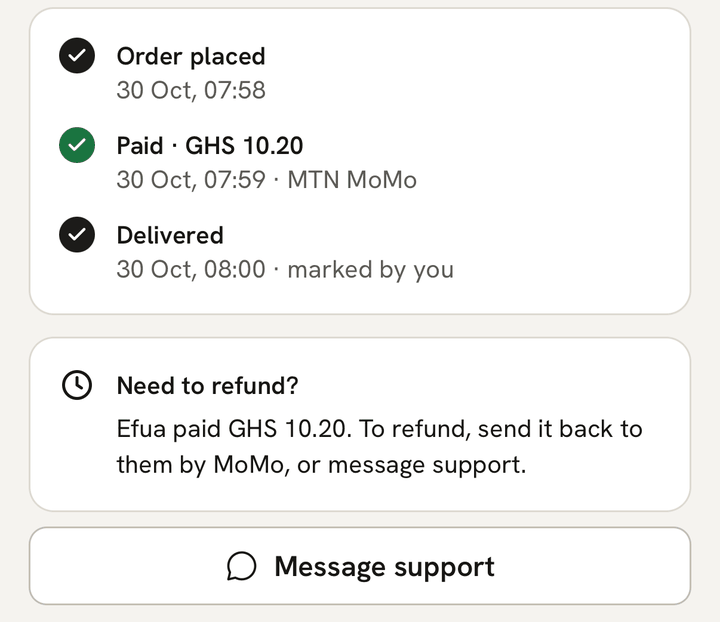
What you see
There’s no Refund button on your orders. A paid or delivered order shows Need to refund? instead:
{first name} paid {amount}. To refund, send it back to them by MoMo, or message support.
You may also get messages from us about a refund we made, money you owe, or a buyer’s complaint. They’re explained below.
What it means
Refunds aren’t made in the app. If you choose to refund a buyer, for a wrong item, a change of mind or as a goodwill gesture, you send the money back yourself.
MeKiosk refunds a buyer through Paystack only when:
- they pay twice, pay after you cancelled, or pay after the order expired and the items sold out;
- they complain their order never arrived, we decide it wasn’t delivered, and you don’t refund them within 48 hours;
- the refund is because of a mistake on our side.
Paystack takes these refunds from MeKiosk, not from your payout. That’s why you repay us afterwards, as section 5 of the terms says.
What to do
To refund a buyer yourself:
- Open the order. Need to refund? shows what the buyer paid: your price plus the MoMo fee they paid.
- Send that amount by MoMo to the buyer’s number. Keep the transaction ID.
- Let the buyer know, for example with the WhatsApp button next to their name.
- If you need help, tap Message support. It opens WhatsApp with the order code filled in.
MeKiosk’s fee and the MoMo fee on that sale aren’t returned to you. The app doesn’t record a refund you send yourself, so the order stays Paid or Delivered, and its payout still comes to you.
If we refunded a buyer for you
You don’t need to do anything. You get a notification titled “Refunded {amount} for order {code}”, by push, and by text too if you’ve turned texts on:
- “A buyer paid twice for order {code}. We’ve refunded the extra {amount}. The order is still paid.”
- “A buyer paid {amount} for order {code} after you cancelled it, so we refunded them.”
- “A buyer paid {amount} for order {code} after it expired and the items were gone, so we refunded them.”
The buyer gets everything they paid back, and a text. A cancelled or expired order then reads, for example, “{first name} paid {amount} after this order was cancelled, so we sent it back to them. We’ve texted you what you owe.”
If a late payment arrives after an order expired and the items are still on sale, there’s no refund. The order comes back as paid, and you deliver it as usual.
When we refund a whole order, after a complaint or for our own mistake, it moves to Refunded in the Other tab and reads “Sent back to {first name}’s MoMo wallet · {date and time}”.
If you owe MeKiosk money
After we refund a buyer for one of your sales, you repay us within 14 days. We tell you by text, even if you’ve turned texts off:
- After a buyer paid twice, after a cancel or after the items sold out: “You owe {amount} for order {code}: we refunded a payment that reached you. Repay it by {date}. Message support for how.” You owe only what reached you from that payment, which is less than the refund.
- After we refunded an order you didn’t deliver: “You owe {amount} for order {code}: we refunded the buyer. Repay it by {date}. Message support for how.” That’s everything the buyer paid, MoMo fee included.
When a refund was our own mistake, you owe nothing: “We refunded order {code} ({amount}) to the buyer because of a mistake on our side. It costs you nothing.”
To repay, message us from Account → Help on WhatsApp and we’ll tell you how to send it by MoMo. We never ask you to pay through a link in a text. Until you repay, we may pause your payments and payouts. The app doesn’t show what you owe, so keep the text.
If a buyer says their order didn’t arrive
A buyer can use Report a problem on their order page. A person at MeKiosk looks into it, and may open a complaint up to 30 days after the payment. Messages about a complaint always come by text, even if you’ve turned texts off.
- You get “A buyer says order {code} hasn’t reached them. Deliver it or send proof to support by {deadline}, or they get a full refund. Message support.” You have 48 hours, and the buyer is told the same deadline.
- Deliver it, or send us proof through Account → Help on WhatsApp: a rider or courier receipt, or a photo of the handover with your chat with the buyer. Marking the order delivered in the app isn’t proof on its own.
- If we have no proof after 24 hours, you get “Reminder: deliver order {code} or send proof to support by {deadline}, or the buyer gets a full refund. Message support.”
- Once we have your proof, the buyer has 48 hours to answer it.
- A person at MeKiosk decides:
- The buyer has it: “The complaint about order {code} is closed: the buyer has it. Thank you.” This doesn’t count against you.
- The buyer doesn’t answer your proof in time: “The complaint about order {code} is closed. Nothing more for you to do.”
- It wasn’t delivered: we ask you to refund the buyer in full by MoMo within 48 hours. Send us the transaction ID when you have. If you don’t, we refund them. You get a notification, “We refunded order {code} ({amount}) to the buyer after looking into a report. Message support if you have questions.”, then a “You owe” text.
Complaints you lose count towards suspension (section 7 of the terms).
If a bank disputes a payment
If a buyer asks their bank or MoMo provider to reverse a payment, we’ll text you and ask for proof of delivery.
Last updated .