My sign-in code didn't arrive
Check the number, wait for Resend code, and only use the newest code. Codes last 10 minutes, and 5 wrong codes pause sign-in for 15 minutes.
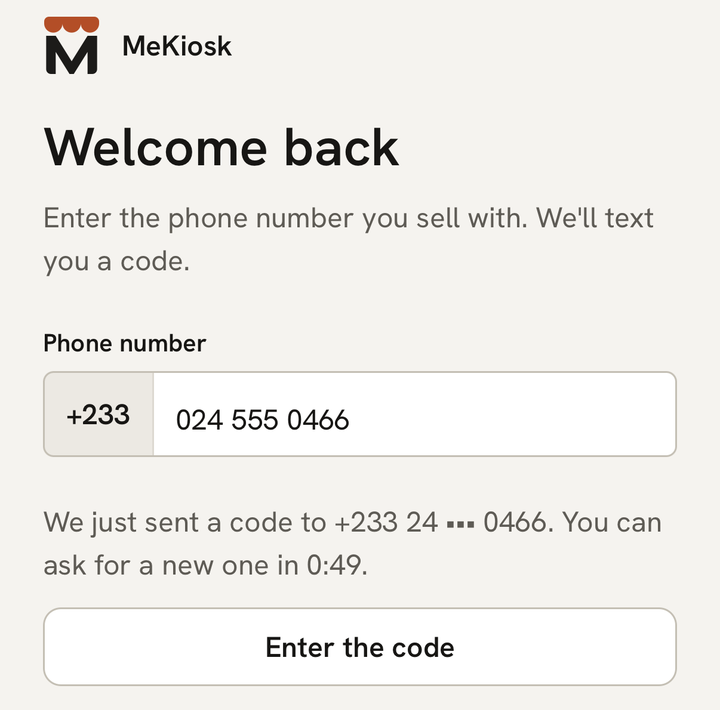
What you see
After you tap Send code, the app opens “Enter the code” and says “Sent by SMS to {number}. Change”. Under the boxes, “Resend code in 0:59” counts down.
The text comes from MeKiosk and reads: “Your code is {code}. It expires in 10 minutes. Never share it with anyone.”
What it means
Texts usually arrive within a minute, but a weak signal or a busy network can slow them down. To protect your store, the app limits how often you can ask for a code:
- You can ask for a new code once a minute.
- Only the newest code works, and each code works once.
- A code lasts 10 minutes.
- A number can get 5 codes in an hour.
What to do
- Check the number after “Sent by SMS to”. If it’s wrong, tap Change and type it again.
- Make sure the SIM with that number is in your phone and has signal. Look in your messages app for a text from MeKiosk.
- Wait until “Resend code in 0:59” turns into Resend code, then tap it.
- Type the code from the newest text and tap Sign in.
Never give your code to anyone, even someone who says they’re from MeKiosk. We will never ask for it.
If it says “We just sent a code”
“We just sent a code to {number}. You can ask for a new one in {time}.” means a code went out less than a minute ago. Tap Enter the code and use it. When the countdown ends, you can ask for another.
If it says you’ve asked for a lot of codes
“You’ve asked for a lot of codes. Try again in {time}, or message MeKiosk support.” means this number has had 5 codes in the last hour. Wait for the countdown. Support can’t lift this limit, but we can help you check why the texts aren’t reaching you.
If your number is refused
- “Enter 9 digits after +233, like 24 123 4567.” The number is too short.
- “The phone number must be a Ghana mobile number.” MeKiosk works only with Ghana mobile numbers, starting 02 or 05. Landlines and foreign numbers can’t sign in.
You can type the number as 024 123 4567, 0241234567 or 24 123 4567, or paste it with +233.
If the code is refused
“That code isn’t right. Check the SMS and try again.” Check the digits. If you asked for more than one code, use the newest. An older code, or one you’ve already used, won’t work.
“This code has expired” means 10 minutes have passed. Tap Send a new code.
If sign-in is paused
After 5 wrong codes, the app shows “5 wrong codes — paused for 15 minutes”, with the time you can try again. Your store and your money are not affected. Wait for the countdown, then tap Send a new code. If you ask for a code before then, you’ll see “Too many tries. Wait {time} and try again.”
If you can’t wait, tap Help on WhatsApp. Support can lift the pause. Then go back and tap Sign in again.
If it says “No store uses this number”
You see “No store uses this number. Check the digits, or create a store with it.” only after the code, because we never say whether a number has a store before it’s confirmed.
- Wrong number? Tap Try another number.
- New to MeKiosk? Tap Create a store with this number.
- Changed your number? Tap Recover my store. How to move your store to a new number.
If it says “No connection” or “Something went wrong”
“No connection. Check your data and try again.” means your phone is offline. Turn on data or Wi-Fi and try again. Your code still works when you’re back online.
“Something went wrong on our side. Try again in a moment.” means the problem is ours. Wait a minute and try again.
Last updated .