When do I get paid?
Each day's paid orders go to your own MoMo wallet the next working day. Weekends and Ghana's public holidays move it to the next working day.
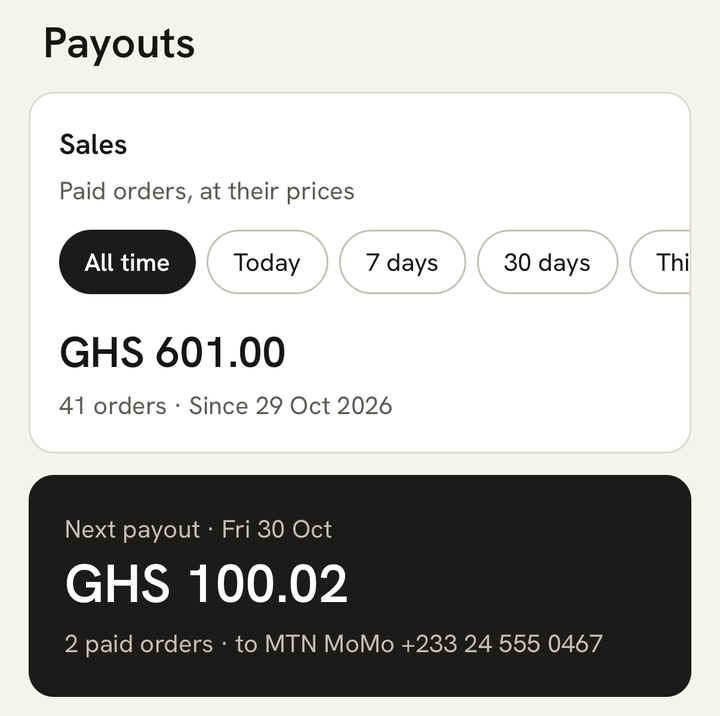
What you see
Once payments are on and a buyer has paid, Home’s “Today’s sales” card has a payout line:
- “Next payout · {day}”, with the wallet it goes to and the amount, while money is waiting to go out.
- “Last payout · sent {day}”, for a week after a payout, while nothing new is waiting.
Tap the line to open Payouts, the last tab at the bottom of the screen. On a tablet it’s in the menu at the side. Payouts shows:
- Sales: your paid orders at their prices, for the period you choose.
- Next payout: the day, the amount after fees and how many paid orders it carries. Tap it to see those orders. With nothing waiting, it says “Nothing to send yet”.
- Past payouts: every payout, newest first, marked Scheduled, Sending, Money sent or Didn’t go through. A sent payout shows the time it was sent. Tap one to see the orders it covered and the total After fees.
Each paid order says where its money is: “In your payout on {day}”, then “Sent to your MoMo · {date}”.
When a payout is sent, you get a notification, “{amount} is on its way”, with “Your payout is on its way to your {network} MoMo.” Tap it to open that payout. If you’ve turned on Text messages (SMS) in Account → Notifications, you also get “{amount} is on its way to your {network} MoMo.”
What it means
Buyers pay through Paystack, our payment provider. Paystack sends your share of each day’s paid orders to your own MoMo wallet the next working day after the payment. Working days are Monday to Friday, except Ghana’s public holidays.
- An order paid on Tuesday goes out on Wednesday.
- Orders paid on Friday, Saturday and Sunday go out together on Monday. At weekends, Payouts says “Weekend — payouts pause until Monday”.
- A public holiday moves the payout to the next working day. Orders paid on Thursday 24 December 2026 go out on Tuesday 29 December, after Christmas Day, the weekend and the Boxing Day holiday on Monday 28 December.
The day counts from when the buyer paid, not when they ordered or when you delivered. The amount is after MeKiosk’s fee and the MoMo fee, so it’s less than your sales figure. See What does MeKiosk charge?
We can’t promise a time of day. Paystack decides when on the payout day the money moves.
What to do
- Open Payouts and check the day on the Next payout card.
- On that day, check your MoMo wallet once the payout shows Money sent, or once you get “{amount} is on its way”.
- To see which orders a payout covered, tap it under Past payouts. Each row shows what you received for that order.
If your wallet is new or you changed it
The first payout to a new or changed wallet waits until the wallet is verified. Until then your paid orders stay in Next payout, and the day on it moves forward to today. Once it’s verified, everything waiting goes out the next working day.
If your store is locked
Payouts pause while your store is locked. The locked screen says “Every phone is signed out, and payouts and checkout are paused.” Under Held for you while locked, Payout paused shows how much is waiting. The money is kept for you. When you unlock with your Ghana Card, payouts start again, and the first one after unlocking can take a little longer while it’s checked again.
If the day has passed and nothing arrived
- The payout says “Didn’t go through”: see Why didn’t my payout go through?
- It says “Money sent”, but the money isn’t in your wallet, or the amount looks wrong: message us within 30 days from Account → Help on WhatsApp, with the payout’s day and amount.
- The payout day has passed and it still isn’t under Past payouts: message us from Account → Help on WhatsApp.
Last updated .